How it works
Where every job comes from, how we check it, and how the website, the extension and our social posts fit together. Everything here runs on free plans.
1. From the employer to your screen
Jobs come only from employers’ own career sites and the public boards their hiring systems publish (Greenhouse, Lever, Ashby, Workday, amazon.jobs and others). Scheduled jobs on GitHub collect them every two hours and save them in one database. The website and the browser extension read from that same database, so they always agree.

Every job is checked again before you see “Checked today”: the daily link check opens each apply page and closes jobs whose page is gone. Read the details in How we verify.
2. From the database to Instagram, YouTube and X
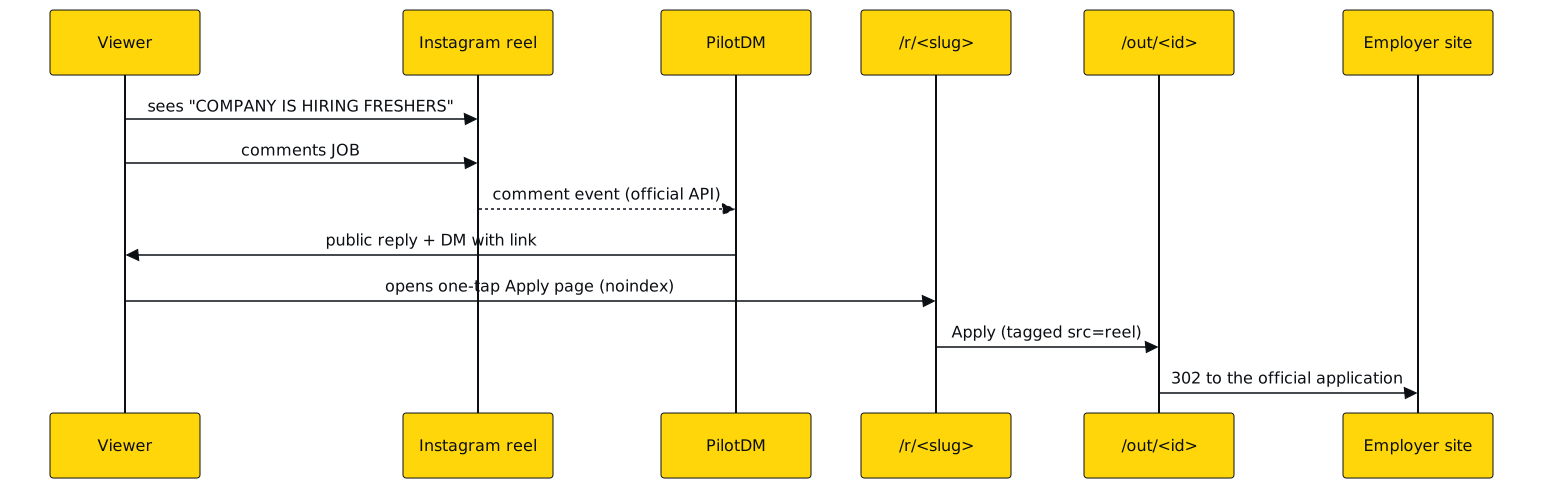
Posts are made from the database too. Each new open fresher, intern or entry-level job gets at most one post per channel, through Buffer’s official API. Comment JOB on an Instagram post and an auto-reply sends you the link. Every post links back to the job here, and from here straight to the employer.

3. What you do
Find, apply and track

From a reel to the application
The browser extension

4. How extension updates work
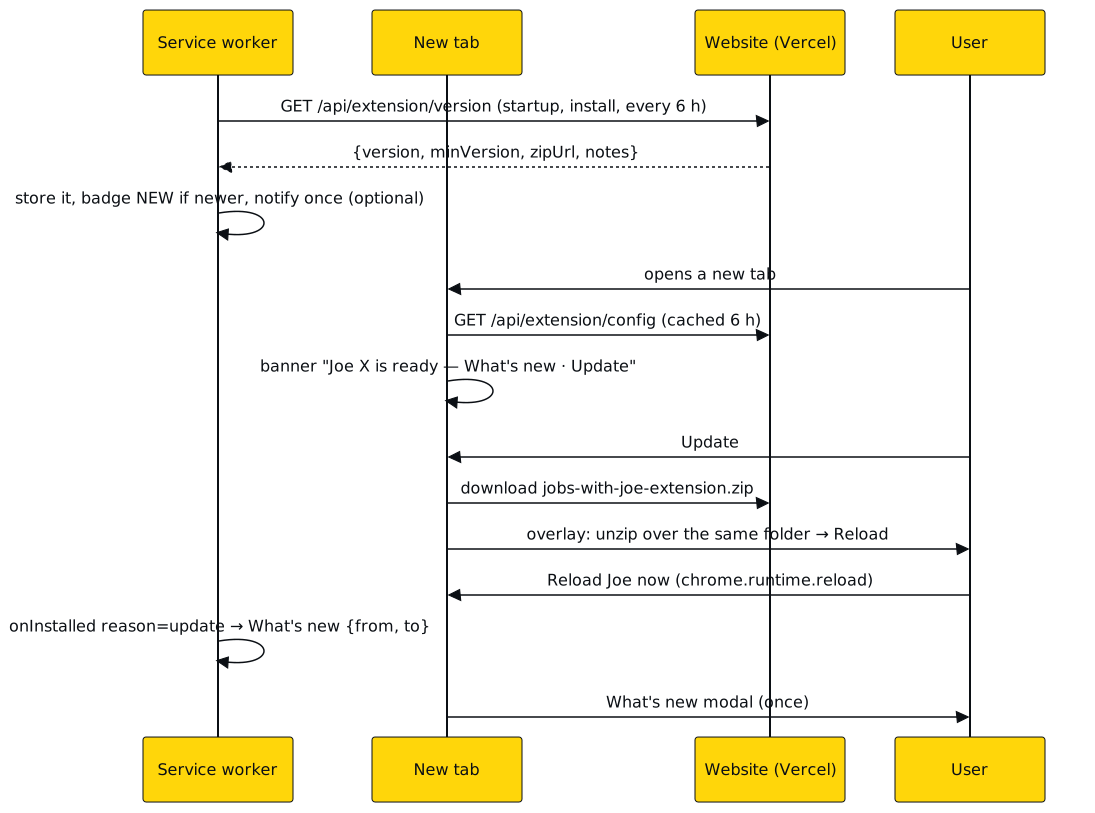
The extension isn’t in the Chrome Web Store (it has a fee, and Joe is free), and Chrome only updates store extensions by itself. So Joe checks this site every 6 hours. When a new version is ready you see NEW on its toolbar icon and a banner on your new tab. One click downloads it and shows the steps: unzip over the same folder, then Reload. Your saved jobs and settings stay. Announcements and categories change from the site without any update. Step-by-step: How updates work.
5. The schedule (India time)
- Every 2 hours: We collect new and changed jobs from every source, in four parallel batches, then send matching job alerts.
- Daily, 10:13: We open every open job’s apply page and close the ones that are gone.
- Daily, 11:23: We read batch, degree, pay and deadline from the employer’s text and update the public fresher list.
- Weekly, Monday 02:47: An encrypted backup of the database.
- 09:00 and a few slots a day: Posts to Instagram, YouTube and X, from new fresher and intern jobs.
- Every 6 hours: The browser extension checks for a new version.
6. When something breaks
- If a company changes its careers site, we get fewer jobs from it until we fix that source; other sources are unaffected.
- If a post fails, it is retried with a pause, then held for a person to review. A job is never posted twice.
- If the website can’t be reached, the extension keeps working from what it saved and from the job database directly.
- Dead apply pages are closed within a day by the link check.
- Everything we count is public on Open stats, and what changed, and when, is on the changelog.
7. Free plans we run on
- Website (Vercel Hobby): 100 GB of transfer and 1 million function calls a month. Most pages are cached.
- Database (Supabase Free): 500 MB of data and 5 GB of transfer a month. Paused after a quiet week, which our 2-hourly collection prevents.
- Backend (Render Free): 750 hours a month shared by two small services that sleep after 15 idle minutes, so the first request can take a minute. The website doesn’t wait on it.
- Schedules (GitHub Actions): Free for public repositories. Scheduled runs can start a few minutes late.
- Posting (Buffer Free) and DMs (PilotDM Free): Official APIs only, within their free plans.
Limits as published by each provider on 15 October 2026. Jobs with Joe is free and has no paid plan; see the No-fee pledge. Questions: contact us.